Configuring Environment Metrics
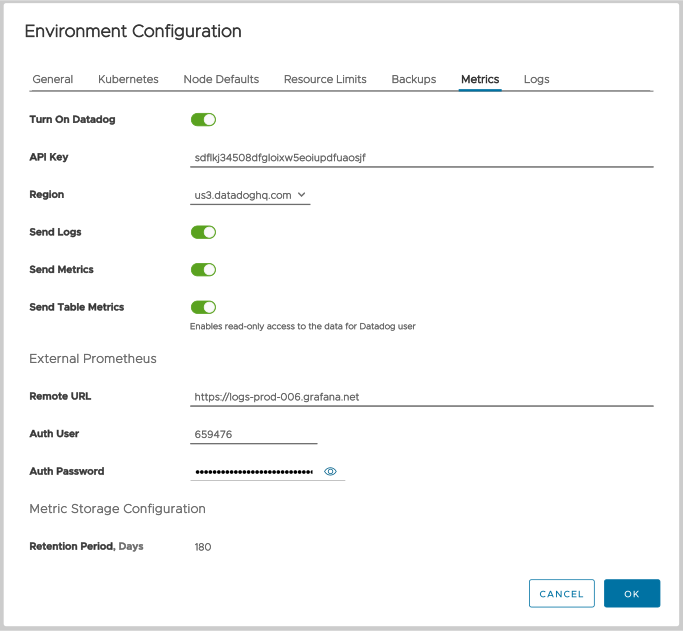
Figure 1 - The Metrics tab
The field details are:
Datadog options
Turn on Datadog
Enables Datadog for clusters in this environment. See Datadog's ClickHouse integration documentation for the details on configuring Datadog and the ClickHouse metrics that Datadog can monitor. Complete details on configuring Datadog access in the Altinity Cloud Monitor are in the section Enabling Datadog at the environment level.
API Key
Your Datadog API key.
Region
The region where your Datadog server is located.
Send Logs | Send Metrics | Send Table Metrics
These buttons allow you to send logs, metrics on the ClickHouse cluster, and/or table-level metrics in your ClickHouse cluster.
External Prometheus configuration options
Remote URL
The URL of your remote Prometheus server. In Figure 1 above, the remote write endpoint is https://logs-prod-006.grafana.net.
Auth User | Auth Password or Auth Token
The credentials for your remote Prometheus server. For greater security, you can also use a bearer token instead of the userid and password.
Metric Storage configuration option
Retention Period, Days
The number of days backups should be kept. The default value for Altinity.Cloud Anywhere environments is 30. For all other environments, this value is 180 and cannot be changed.