Configuring the Altinity Kubernetes Operator for ClickHouse®
The Operator Configuration tab of the Environment overview panel lets you make changes to the settings of the Altinity Kubernetes Operator for ClickHouse®. See the operator's configuration documentation in the project repo for complete details.
ConfigMaps
Click the  icon and select Operator Configuration from the dropdown menu. You’ll see a list of ConfigMaps:
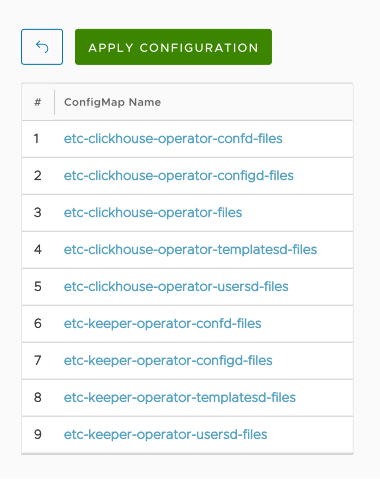
Figure 1 - The list of Operator ConfigMaps
Clicking on any item in the list takes you to a dialog where you can configure the operator by making changes to the configuration files in that ConfigMap:
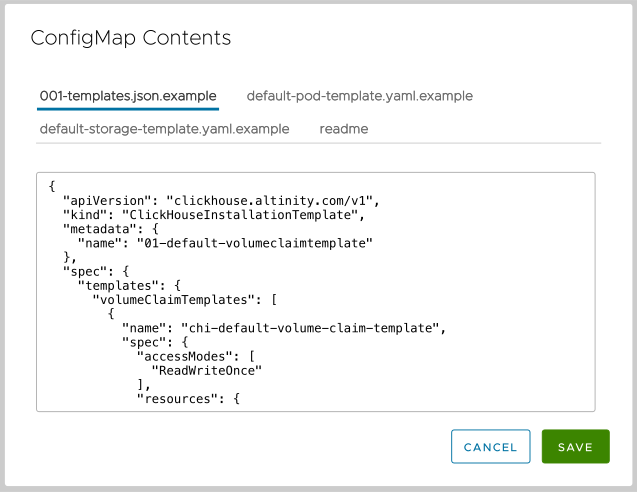
Figure 2 - A sample ConfigMap
In this case, the tabs across the dialog let you edit the four files in the etc-clickhouse-operator-templatesd-files ConfigMap. Make your changes, then click the SAVE button. (BTW, many of the files specifically warn you against modifying them, as they are generated and any changes you make may be overwritten.)
ClickHouseOperatorConfigurations
The dialog also has a tab for ClickHouseOperatorConfigurations:
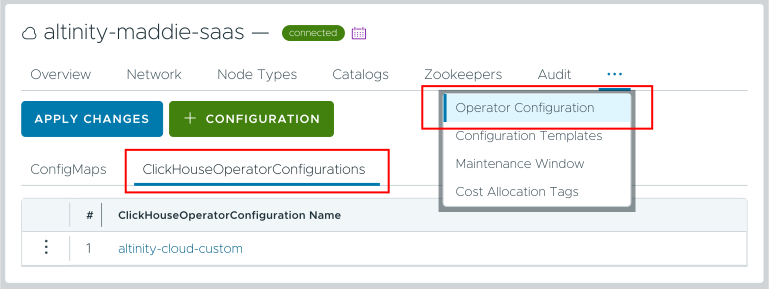
Figure 3 - The list of ClickHouseOperatorConfigurations
As with ConfigMaps, clicking the name of a configuration opens a dialog that lets you edit it. Make your changes and click SAVE. In addition, you can click the  button to create a new configuration. Finally, you can delete a configuration by clicking the
  icon and selecting Delete from the popup menu.
When you’re done, click the  button to save your changes.