Configuring Logging
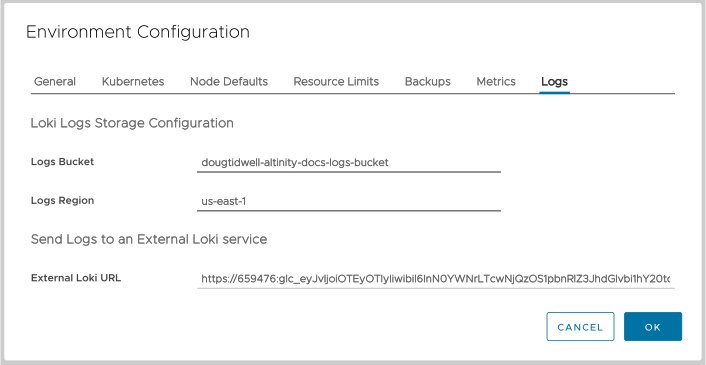
Figure 1 - The Logs tab
Here are the details of these fields:
Loki Logs Storage Configuration
Logs Bucket | Logs Region
The name of the bucket where your Loki logs should be stored and the region where the bucket is hosted. The bucket is used internally by the ACM; it’s not accessible by users. In addition, this setting is only used for Bring Your Own Kubernetes (BYOK) environments. For Bring Your Own Cloud (BYOC) environments, the bucket is configured automatically and these fields are not editable.
Send Logs to an External Loki service
External Loki URL
The URL of your external Loki server in the format https://username:password@lokiserver.com/api/prom/push. For complete details on integrating your Altinity.Cloud environment with an external Loki server, see the Administrator Guide section on Integrating Loki.
Sending Logs to an S3 bucket in a BYOK environment
If you have a BYOK environment on AWS, you can create an S3 bucket for logs. The recommended way is to use IRSA.
apiVersion: v1
kind: ServiceAccount
metadata:
  name: log-storage
  namespace: altinity-cloud-system
  annotations:
    eks.amazonaws.com/role-arn: "arn:aws:iam::<aws_account_id>:role/<role_arn>"
Alternatively, you can use a custom Instance Profile or explicit credentials (shown below).
# create bucket
aws s3api create-bucket --bucket REPLACE_WITH_BUCKET_NAME --region REPLACE_WITH_AWS_REGION

# create user with access to the bucket
aws iam create-user --user-name REPLACE_WITH_USER_NAME
aws iam put-user-policy \
    --user-name REPLACE_WITH_USER_NAME \
    --policy-name REPLACE_WITH_POLICY_NAME \
    --policy-document \
'{
    "Version": "2012-10-17",
    "Statement": [
        {
            "Action": [
                "s3:ListBucket",
                "s3:PutObject",
                "s3:GetObject",
                "s3:DeleteObject"
            ],
            "Resource": [
                "arn:aws:s3:::REPLACE_WITH_BUCKET_NAME",
                "arn:aws:s3:::REPLACE_WITH_BUCKET_NAME/*"
            ],
            "Effect": "Allow"
        }
    ]
}'

# generate access key
aws iam create-access-key --user-name REPLACE_WITH_USER_NAME |
  jq -r '"AWS_ACCESS_KEY_ID="+(.AccessKey.AccessKeyId)+"\nAWS_SECRET_ACCESS_KEY="+(.AccessKey.SecretAccessKey)+"\n"' > credentials.env

# create altinity-cloud-system/log-storage-aws secret containing AWS_ACCESS_KEY_ID & AWS_SECRET_ACCESS_KEY
kubectl create secret -n altinity-cloud-system generic log-storage-aws \
  --from-env-file=credentials.env

rm -i credentials.env
Once the secret and bucket are created, you can enter the name of the bucket and its region in the Logging tab of the Environment configuration dialog in Figure 1 above.