Working with Hybrid Tables
Hybrid tables are one of the most powerful features of Project Antalya. The Hybrid engine gives you the ability to keep some of your data in a traditional MergeTree engine and some of your data in an Iceberg catalog, then run a single query across all of your data. Your hot data can stay in block storage for maximum performance, while your cold data can move to object storage for the cost savings.
Comparison of storage types
Here’s how MergeTree tables and Iceberg catalogs compare:
| MergeTree table | Iceberg catalog |
|---|---|
| Loads almost instantly | Loaded in batches, e.g., every hour |
| Compaction is built-in and fast | Compaction is external and often slow |
| Low latency to first record | High latency to first record |
| Expensive | Cheaper storage and compute |
| Scaling is slow and limited: vertical scaling | Fast horizontal and vertical scaling |
| Limited I/O bandwidth | Unlimited I/O bandwidth |
| Access only through ClickHouse server | Shareable with other applications |
Hybrid tables give you a tremendous amount of flexibility. You define what hot and cold data looks like, then the Hybrid table engine manages that for you. You create a Hybrid table with a date called a watermark, something like “look in hot storage for any data newer than January 1st, 2025, and look in cold storage for anything older.”
Our scenario
We’ll move on from the blockchain dataset to a database of New York City taxi data from October 2024 through March 2025. Here we’ll work with data that’s in our ClickHouse cluster, not somewhere on the internet. At first, all of our data will be stored in a MergeTree. That has great performance, but all of our data will be in expensive block storage. Here’s our starting point:
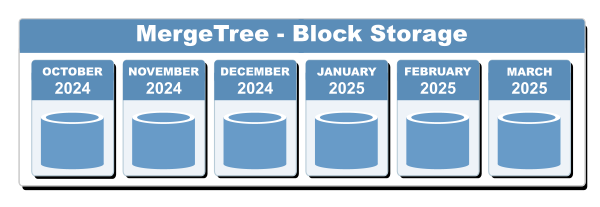
Figure 1 - A MergeTree table - all data in block storage
What we’ll move to is a Hybrid table that has the data from October through December 2024 (cold data) in Parquet files in object storage, and January through March 2025 (hot data) in block storage. Our watermark will be January 1, 2025. Here’s our goal:
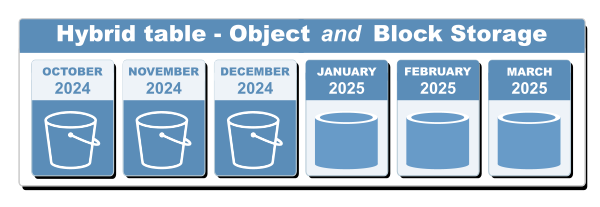
Figure 2 - A Hybrid table - some data in object storage, some in block storage
What makes the scenario in Figure 2 work is the Hybrid table engine. With a Hybrid table, we can execute a single query against all of our data. If that query is against hot data, the performance is virtually identical to our original MergeTree. But we’re not paying for expensive block storage for all of our cold data. If the query includes cold data as well, ClickHouse still finds all of our data. The performance will be slower than our original MergeTree, but our costs will be lower.
Best of all, we have complete control of how the data is partitioned. We know what data we work with most, so we can decide the best point in time to separate our data.
Iceberg catalogs and Parquet files
Data in cold storage uses two crucial technologies: Iceberg catalogs and Parquet files. We’ll use an S3-compatible bucket that will hold the catalog and the files. The Iceberg catalog will contain metadata about the Parquet files and the data they contain, so ClickHouse will start by looking at the Iceberg catalog, then looking at the appropriate Parquet files. The DataLakeCatalog engine lets us access an Iceberg catalog as if it were any other ClickHouse table.
Let’s get to work!
We’ll go through these steps to create a Hybrid table:
- Use Antalya features to export cold data from a MergeTree to a Parquet file in S3
- Use
iceto process the Parquet files we created and update the Iceberg catalog - Delete the cold data from the MergeTree
- Create the Hybrid table, pointing to the original MergeTree for hot data and the Iceberg catalog for cold data.
A key point here is that we’ll be working with partitioning. In our taxi data example, we’ll partition our tables by month. That makes it very easy and efficient for Iceberg to find the Parquet files that ClickHouse needs to search. We might have 20 years’ worth of taxi data, but if we want to analyze March 2024, Iceberg points ClickHouse to the Parquet files from that month. With exactly 20 years of data, that means ClickHouse can ignore 239 of the 240 partitions, making the query orders of magnitude simpler and faster. Even better, we’ll sort the data in our Parquet files, so ClickHouse may be able to ignore even more data inside the Parquet files for a given month.
Enough explaining, it’s time to create the infrastructure we need and see a Hybrid table in action.
Create the database and tables we need
First, let’s create the database we’ll use throughout:
CREATE DATABASE antalya;
Next, create the table for the taxi data:
CREATE TABLE antalya.taxi_rides ON CLUSTER '{cluster}'
(
    VendorID Int32,
    tpep_pickup_datetime DateTime,
    tpep_dropoff_datetime DateTime,
    passenger_count Nullable(Float64),
    trip_distance Float64,
    RatecodeID Nullable(Float64),
    store_and_fwd_flag Nullable(String),
    PULocationID Int32,
    DOLocationID Int32,
    payment_type Int64,
    fare_amount Float64,
    extra Float64,
    mta_tax Float64,
    tip_amount Float64,
    tolls_amount Float64,
    improvement_surcharge Float64,
    total_amount Float64,
    congestion_surcharge Nullable(Float64),
    Airport_fee Nullable(Float64)
)
ENGINE = ReplicatedMergeTree('/clickhouse/tables/{shard}/antalya/taxi_rides', '{replica}')
PARTITION BY toYYYYMM(tpep_pickup_datetime)
ORDER BY (PULocationID, DOLocationID, tpep_pickup_datetime);
Notice that we’re partitioning our data by month, but we’re doing that with the function toYYYYMM(tpep_pickup_datetime) instead of creating a column in the table itself.
Now let’s create the table of metadata. If a taxi ride started at pickup location 132 (PULocationID = 132), the metadata tells us that’s JFK Airport in Queens. That’ll be useful for some queries we’ll look at later.
CREATE TABLE antalya.taxi_zones ON CLUSTER '{cluster}'
(
    `LocationID` Int32,
    `Borough` String,
    `Zone` String,
    `service_zone` String
)
ENGINE = ReplicatedMergeTree('/clickhouse/{cluster}/tables/antalya/taxi_zones', '{replica}')
ORDER BY LocationID
SETTINGS index_granularity = 8192;
Now import the taxi data from October 2024 into the taxi_rides table:
INSERT INTO antalya.taxi_rides
SELECT * FROM url('https://d37ci6vzurychx.cloudfront.net/trip-data/yellow_tripdata_2024-{10,11,12}.parquet',
                  'Parquet'
);
INSERT INTO antalya.taxi_rides
SELECT * FROM url('https://d37ci6vzurychx.cloudfront.net/trip-data/yellow_tripdata_2025-{01,02,03}.parquet',
                  'Parquet'
);
You should have 22,346,537 rows:
SELECT count() from antalya.taxi_rides;

   ┌──count()─┐
1. │ 22346537 │ -- 22.35 million
   └──────────┘
Populate the database of zone and borough names:
INSERT INTO antalya.taxi_zones
SELECT * FROM url(
    'https://d37ci6vzurychx.cloudfront.net/misc/taxi_zone_lookup.csv',
    'CSVWithNames'
);
You should have 265 records:
SELECT count() FROM antalya.taxi_zones;

   ┌─count()─┐
1. │     265 │
   └─────────┘
Cleaning up the data
From having worked with NYC taxi data in the past, we know there can be some bad data in the source files. Let’s see if we have any data that’s out of range:
SELECT count() FROM antalya.taxi_rides
  WHERE toYYYYMM(tpep_pickup_datetime)
  NOT IN (202410, 202411, 202412, 202501, 202502, 202503);
Sure enough, there are a few records in there:
   ┌─count()─┐
1. │      23 │
   └─────────┘
To simplify our lives, we’ll delete the records we don’t care about:
DELETE FROM antalya.taxi_rides
  WHERE toYYYYMM(tpep_pickup_datetime)
  NOT IN (202410, 202411, 202412, 202501, 202502, 202503);
From now on, we’ll have 22,346,514 total records in our dataset.
Creating our Iceberg catalog database
To set up our Hybrid table, we’ll export some of our data as Parquet files in S3-compatible storage. Before we do that, we need to create a database with the DataLakeCatalog engine. We only need one DataLakeCatalog database in our environment. If it doesn’t exist already, fill in this statement with the appropriate values and create the table:
CREATE DATABASE ice
  ENGINE = DataLakeCatalog('https://iceberg-catalog.altinity-maddie-saas.altinity.cloud')
  SETTINGS catalog_type = 'rest',
    auth_header = 'Authorization: Bearer abcdef0123456789abcdef0123456789',
    warehouse = 's3://altidocs-01234567-iceberg';
The DataLakeCatalog engine lets us access data in the data lake just like any other ClickHouse table. You’ll need the details of the Iceberg catalog that’s part of your environment. From the Environment display, click the Catalogs tab to see your details:
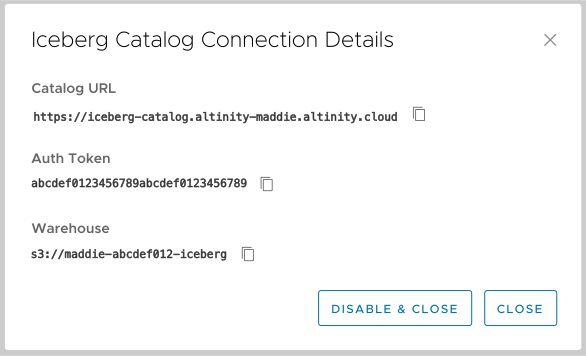
Figure 3 - The Iceberg catalog details
(See the Enabling Iceberg Catalogs documentation for complete instructions on how to find your Iceberg catalog details.)
Use the values of Catalog URL, Auth Token, and Warehouse in Figure 3 to fill in the URL of the catalog, the auth_header setting, and the warehouse setting. You must define the authentication header as shown in the CREATE TABLE statement above.
After we export our Parquet files to the S3 bucket altinity-01234567-iceberg, we’ll use the ice tool to update the Iceberg catalog.
Exporting our data as Parquet files in S3
Now we’ll export the data from October through December to our S3 bucket. We’ll use Antalya’s ALTER TABLE EXPORT PART command to do that. (Our data is already partitioned, so there’s no reason to use SELECT to find the data we want.)
PRO TIP
If you’re working in the ACM, be sure to turn off the slider above the Query window before running
 ALTER TABLE EXPORT PART. If you forget, it will fail immediately with the message Unsupported type of ALTER query. If you’re in clickhouse-client, you may need to run SET allow_distributed_ddl = 0;.
This SELECT statement gets the list of parts we care about, then generates the command we need to export each one:
SELECT
    'ALTER TABLE antalya.taxi_rides EXPORT PART ''' || name ||
    ''' TO TABLE FUNCTION s3(\'s3://altinity-01234567-iceberg/antalya/taxi_rides/data/pickup_month={_partition_id}/{_file}.parquet\', format=\'parquet\') PARTITION BY toYYYYMM(tpep_pickup_datetime) SETTINGS allow_experimental_export_merge_tree_part = 1;'
FROM system.parts
WHERE database = 'antalya' AND table = 'taxi_rides'
  AND active AND partition IN ('202410', '202411', '202412')
    FORMAT TSVRaw;
You’ll get a list of commands:
ALTER TABLE antalya.taxi_rides EXPORT PART '202410_0_5_1_6' TO TABLE FUNCTION s3('s3://altinity-01234567-iceberg/antalya/taxi_rides/data/pickup_month={_partition_id}/{_file}.parquet', format='parquet') PARTITION BY toYYYYMM(tpep_pickup_datetime) SETTINGS allow_experimental_export_merge_tree_part = 1;
ALTER TABLE antalya.taxi_rides EXPORT PART '202410_7_14_1' TO TABLE FUNCTION s3('s3://altinity-01234567-iceberg/antalya/taxi_rides/data/pickup_month={_partition_id}/{_file}.parquet', format='parquet') PARTITION BY toYYYYMM(tpep_pickup_datetime) SETTINGS allow_experimental_export_merge_tree_part = 1;
ALTER TABLE antalya.taxi_rides EXPORT PART '202411_0_7_2_8' TO TABLE FUNCTION s3('s3://altinity-01234567-iceberg/antalya/taxi_rides/data/pickup_month={_partition_id}/{_file}.parquet', format='parquet') PARTITION BY toYYYYMM(tpep_pickup_datetime) SETTINGS allow_experimental_export_merge_tree_part = 1;
-- more commands follow, one for each part
The ALTER TABLE EXPORT PART statements export the data to our S3 bucket, using the partition key to store each month’s data in a separate directory. Some notes on the generated commands:
- The high-level path is
antalya/taxi-rides. We’re going to create a database table namedantalya.taxi_ridesin a minute. The path and table name should be the same as they are here; if they aren’t, you’ll get an odd error message that asks you to rerun theicecommand. More on that in a minute. - We’re creating a directory structure where all the Parquet files from a particular partition will be stored in a directory named something like
pickup_month=202410. You must include the partition name ({_partition_id}) in the directory name. - We’re using
{_file}to use the part name (not the partition name) and.parquetas the filename. You must put.parquetat the end of the filename. Theicetool will only process a file if it has theparquetextension. - We have to add
SETTINGS allow_experimental_export_merge_tree_part = 1to the end of each command for this to work. If you like, you can add this setting to a profile or as a server setting so you don’t have to specify it. See the documentation for configuring profiles or configuring settings for all the details.
After you run the commands, the directory structure in the bucket looks like this (you’ll probably have a lot more files, btw):
└── antalya
    └── taxi_rides
        ├── pickup_month=202410
        │   ├── 202410_0_5_1_6_67854861854DE58A5421A0946E0DFDE4.1.parquet
        │   ├── 202410_7_14_1_0909CF2BEF1F8DD6AB3AF473C9A01E84.1.parquet
        │   ├── commit_202410_0_5_1_6_67854861854DE58A5421A0946E0DFDE4
        │   └── commit_202410_7_14_1_0909CF2BEF1F8DD6AB3AF473C9A01E84
        ├── pickup_month=202411
        │   ├── 202411_0_7_2_8_63B8B9CB5A2800126D531DEE5FCF34DC.1.parquet
        │   └── commit_202411_0_7_2_8_63B8B9CB5A2800126D531DEE5FCF34DC
        └── pickup_month=202412
            ├── 202412_0_0_0_6_8F45BFD6BA4D6791043396CBB2E248F6.1.parquet
            └── commit_202412_0_0_0_6_8F45BFD6BA4D6791043396CBB2E248F6
(We’ll talk about the commit_... files in a minute.)
Monitoring exports
If you’re curious about what’s happening, while ALTER TABLE EXPORT PART is running, the system.exports table shows extensive details about the export in progress:
SELECT *
FROM system.exports

Query id: c30958df-0bd7-4e37-9e4a-2f4715cfefef

┌─source_database──┬─source_table─┬─destination_database─┬─destination_table─┬─────────create_time─┬─part_name──────┬─query_id─────────────────────────────┬─destination_file_paths────────────────────────────────────────────────────────────────────────────────────┬─────elapsed─┬─rows_read─┬─total_rows_to_read─┬─total_size_bytes_compressed─┬─total_size_bytes_uncompressed─┬─bytes_read_uncompressed─┬─memory_usage─┬─peak_memory_usage─┐
│ antalya          │ taxi_rides   │ _table_function      │ s3                │ 2026-03-17 15:25:25 │ 202410_0_5_1_8 │ 33e84394-e4fc-4f74-b897-9699714fc31a │ ['antalya/taxi_rides/data/pickup_month=202410/202410_0_5_1_8_088654C7E4BDBF8D299DD3F1ABD26BAA.1.parquet'] │ 1.033084452 │   2351072 │            2816672 │                    73674655 │                     369187480 │               324447936 │    251859947 │         379777179 │
│ antalya          │ taxi_rides   │ _table_function      │ s3                │ 2026-03-17 15:25:25 │ 202410_6_6_0_8 │ babd8dc7-1a81-4920-9279-4481646f2319 │ ['antalya/taxi_rides/data/pickup_month=202410/202410_6_6_0_8_6C7B24D675071A6CAFC03A05954B497F.1.parquet'] │ 0.515546307 │    459894 │             459894 │                    12147451 │                      60280218 │                63465372 │     62223051 │         149665563 │
│ antalya          │ taxi_rides   │ _table_function      │ s3                │ 2026-03-17 15:25:25 │ 202410_7_7_0_8 │ a22f3fa8-5941-4972-a0fb-fde5061b8438 │ ['antalya/taxi_rides/data/pickup_month=202410/202410_7_7_0_8_5187C9F9D80C70DE986CC9AE0EE29606.1.parquet'] │ 0.438533292 │    557199 │             557199 │                    14256028 │                      68410739 │                72442983 │    182601452 │         182601452 │
│ antalya          │ taxi_rides   │ _table_function      │ s3                │ 2026-03-17 15:25:26 │ 202411_1_1_0_8 │ 27e181f4-fd0e-4561-bdef-aea3d2c14b91 │ ['antalya/taxi_rides/data/pickup_month=202411/202411_1_1_0_8_BE7F6A05A6AA082CAA87B1F64D9877C9.1.parquet'] │ 0.282502477 │    590713 │             590713 │                    15507638 │                      77426915 │                81518394 │    117427804 │         121687772 │
└──────────────────┴──────────────┴──────────────────────┴───────────────────┴─────────────────────┴────────────────┴──────────────────────────────────────┴───────────────────────────────────────────────────────────────────────────────────────────────────────────┴─────────────┴───────────┴────────────────────┴─────────────────────────────┴───────────────────────────────┴─────────────────────────┴──────────────┴───────────────────┘
The records in the system.exports table are ephemeral; once a part is exported, it won’t be in the table anymore. The table only contains records for exports currently in progress. To see details about exports later, you can look in system.part_log:
SELECT * FROM system.part_log WHERE part_name='202410_0_5_1_8'
Updating the Iceberg catalog with ice
Now we’ll use Altinity's open-source ice tool to process the Parquet files and update the Iceberg catalog with the metadata from those Parquet files.
NOTE: ice writes data to the S3 bucket that contains our Parquet files and the Iceberg catalog. That means your AWS credentials must be set when you run it.
Run this command to update the Iceberg catalog:
ice insert antalya.taxi_rides -p 's3://altinity-01234567-iceberg/antalya/taxi_rides/data/**/*.parquet' \
  --no-copy \
  --thread-count=10 \
  --partition='[{"column":"tpep_pickup_datetime","transform":"month"}]' \
  --sort='[{"column":"PULocationID"}, {"column":"DOLocationID"}, {"column":"tpep_pickup_datetime"}]'
The ice command creates a table named antalya.taxi_rides in the ice database. Notes on the command options:
- The Parquet files we created above are already in the same S3 bucket as our Iceberg catalog, so we use the
--no-copyattribute to tellicenot to make a copy of the data. - We’re giving
ice10 threads to do its work. - The
--partitionattribute is part of the Iceberg spec; it allows us to create a partition key by converting a DateTime value to a month. (There are other options, includinghour,day, andyear. See the Iceberg partitioning spec if you’d like more details.) - Finally, specifying a sort order makes queries against the Iceberg catalog even more efficient. Our assumption is that we’ll be doing lots of queries about pickup and drop off locations. For example, “How many rides are there from JFK airport for each day of the week?” Having the data sorted by the
PULocationIDlets ClickHouse skip directly to the data for that value (for JFK Airport it’s132).
NOTE: The name of our table is antalya.taxi_rides, and the path to our Parquet files starts with antalya/taxi_rides. If those don’t match (you create a table named antalya.ride_data, for example), you’ll get an error from ice because the Parquet files aren’t where it expects them to be. You can run the ice command again with the --force-no-copy option, but…don’t. Make sure your table name matches your directory structure.
Assuming ice processed our data without errors, the new table should have only data from October, November, and December. Let’s take a look:
SELECT count() FROM ice.`antalya.taxi_rides`;
SELECT count() FROM antalya.taxi_rides
  WHERE toYYYYMM(tpep_pickup_datetime)
  IN (202410, 202411, 202412);
(Notice that we have to use ` backticks ` around the table name in the ice database.) We’ve got the same data in both places:
   ┌──count()─┐
1. │ 11148508 │ -- 11.15 million
   └──────────┘

   ┌──count()─┐
1. │ 11148508 │ -- 11.15 million
   └──────────┘
Out of paranoia, let’s check one more thing. When we run ALTER TABLE EXPORT PART, Antalya writes the Parquet file to the S3 bucket. After all the data has been written, it creates the commit_... files we saw earlier. This query checks our S3 bucket, looks for every Parquet file Antalya created, then makes sure there’s a corresponding commit_... file:
SELECT
    p.name,
    arrayExists(
            x -> x LIKE concat('%commit_', p.name, '%'),
            (SELECT groupArray(_path) FROM s3('s3://altinity-01234567-iceberg/antalya/taxi_rides/data/**/commit_*', 'One'))
    ) AS has_commit
FROM system.parts p
WHERE p.database = 'antalya' AND p.table = 'taxi_rides'
  AND p.active AND p.partition IN ('202410', '202411', '202412')
ORDER BY has_commit ASC
You should see has_commit = 1 for every part we exported:
    ┌─name───────────┬─has_commit─┐
 1. │ 202410_0_5_1_6 │          1 │
 2. │ 202410_7_14_1  │          1 │
 3. │ 202411_0_7_2_8 │          1 │
 . . .
(That was totally overkill, but better safe than sorry.)
Now let’s delete the parts we just moved into object storage. This SELECT statement gets the list of parts and generates the ALTER TABLE DROP PART commands we’ll need:
SELECT
    'ALTER TABLE antalya.taxi_rides DROP PART ''' || name || ''';'
FROM system.parts
WHERE database = 'antalya' AND table = 'taxi_rides'
  AND active AND partition IN ('202410', '202411', '202412')
FORMAT TSVRaw;
The commands will look like this:
ALTER TABLE antalya.taxi_rides DROP PART '202410_0_5_1_6';
ALTER TABLE antalya.taxi_rides DROP PART '202410_7_14_1';
ALTER TABLE antalya.taxi_rides DROP PART '202411_0_7_2_8';
-- more commands follow, one for each part
Copy, paste, and run those commands. All our data still exists, but half of it is in expensive block storage and half of it is in much cheaper object storage.
Creating our Hybrid table
Now it’s time to create our Hybrid table. Here’s the syntax:
CREATE TABLE antalya.taxi_rides_hybrid AS antalya.taxi_rides
ENGINE = Hybrid(
    cluster('{cluster}', antalya.taxi_rides),
    tpep_pickup_datetime >= '2025-01-01',
    ice.`antalya.taxi_rides`,
    tpep_pickup_datetime < '2025-01-01'
)
SETTINGS allow_experimental_hybrid_table=1;
We’re creating a Hybrid table cleverly named antalya.taxi_rides_hybrid. It has the same schema as antalya.taxi_rides. For any data from January 1, 2025 or later, the Hybrid table engine will look in the antalya.taxi_rides table; for anything earlier than that, it will look in ice.`antalya.taxi_rides`.
With the table created, let’s put it to the test! Our hybrid table should have the same number of records as the tables we have in hot and cold storage:
SELECT count() FROM antalya.taxi_rides_hybrid;
SELECT
    (SELECT count() FROM antalya.taxi_rides) +
    (SELECT count() FROM ice.`antalya.taxi_rides`) AS total_count
It all checks out:
   ┌──count()─┐
1. │ 22346514 │ -- 22.35 million
   └──────────┘

   ┌─total_count─┐
1. │    22346514 │ -- 22.35 million
   └─────────────┘
Success!
Querying our Hybrid table
All our data is where it’s supposed to be, so let’s run a couple of queries. First, we’ll look at the average taxi fare for each hour of the day during November 2024:
SELECT
    toHour(tpep_pickup_datetime) AS hour,
    count() AS trips,
    round(avg(fare_amount), 2) AS avg_fare
FROM antalya.taxi_rides_hybrid
WHERE toYYYYMM(tpep_pickup_datetime) = 202411
GROUP BY hour
ORDER BY hour
Here are our results. There’s a peak around the morning rush hour and the evening rush hour:
    ┌─hour─┬──trips─┬─avg_fare─┐
 1. │    0 │ 103937 │    18.56 │
 2. │    1 │  73719 │    16.32 │
 3. │    2 │  46407 │    15.59 │
 4. │    3 │  31382 │    16.76 │
 5. │    4 │  23317 │    22.02 │
 6. │    5 │  25688 │    26.29 │
 7. │    6 │  51983 │    21.59 │
 8. │    7 │ 100120 │    19.04 │
 9. │    8 │ 134146 │    18.12 │
10. │    9 │ 149096 │    17.98 │
11. │   10 │ 163275 │    18.31 │
12. │   11 │ 176710 │     18.6 │
13. │   12 │ 192349 │    19.28 │
14. │   13 │ 199743 │    20.03 │
15. │   14 │ 215613 │    20.81 │
16. │   15 │ 226117 │    20.71 │
17. │   16 │ 233934 │    22.21 │
18. │   17 │ 253888 │    19.39 │
19. │   18 │ 262319 │    17.97 │
20. │   19 │ 228222 │    18.32 │
21. │   20 │ 205584 │    18.73 │
22. │   21 │ 206978 │    18.33 │
23. │   22 │ 191411 │    18.68 │
24. │   23 │ 150434 │    19.28 │
    └──────┴────────┴──────────┘
Here’s a more complicated example, what is the total of all fares for each borough from December 2024 through March 2025, ordered by borough. Most importantly, this query involves a JOIN on the antalya.taxi_zones table so we can find the borough for a given taxi ride:
SELECT
    tz.Borough                        AS borough,
    round(sum(t.total_amount), 2)     AS total_revenue,
    count()                           AS trip_count,
    round(avg(t.total_amount), 2)     AS avg_fare
FROM antalya.taxi_rides_hybrid AS t
         LEFT JOIN antalya.taxi_zones AS tz ON t.PULocationID = tz.LocationID
WHERE toYYYYMM(t.tpep_pickup_datetime)
    BETWEEN 202412 AND 202503
  AND tz.Borough IN ('Bronx', 'Brooklyn', 'Manhattan', 'Queens', 'Staten Island')
GROUP BY borough
The results include hot data as well as cold data:
   ┌─borough───────┬─total_revenue─┬─trip_count─┬─avg_fare─┐
1. │ Manhattan     │  295582401.52 │   13078025 │     22.6 │
2. │ Brooklyn      │   10146583.49 │     367416 │    27.62 │
3. │ Queens        │   81376110.57 │    1297234 │    62.73 │
4. │ Bronx         │    2507329.09 │      81711 │    30.69 │
5. │ Staten Island │      46275.34 │       1173 │    39.45 │
   └───────────────┴───────────────┴────────────┴──────────┘
Performance numbers for this query:
query time: 1.356s, read rows: 11198536, read bytes: 228143974
What about swarms?
Let’s use swarms with our queries above. The query that got the average fare for every day of November 2024 performed like this:
query time: 1.829s, read rows: 3646372, read bytes: 50127291
Here’s the swarm-enabled version of the query:
SELECT
    toHour(tpep_pickup_datetime) AS hour,
    count() AS trips,
    round(avg(fare_amount), 2) AS avg_fare
FROM antalya.taxi_rides_hybrid
WHERE toYYYYMM(tpep_pickup_datetime) = 202411
GROUP BY hour
ORDER BY hour
SETTINGS object_storage_cluster='maddie-swarm'
The swarm-enabled query makes things a little more than 5X faster:
query time: 0.339s, read rows: 3646372, read bytes: 50127291
And running with the swarm again with a warm cache gets us to a little over 6X:
query time: 0.286s, read rows: 3646372, read bytes: 50127291
Now let’s look at the swarm-enabled query of taxi rides, revenue, and average fare for each borough. Here are the performance numbers for the original query:
query time: 1.356s, read rows: 11198536, read bytes: 228143974
Now let’s add swarms to the mix. Because this query involves a JOIN, we have to add the object_storage_cluster_join_mode='local' setting:
SELECT
    tz.Borough                        AS borough,
    round(sum(t.total_amount), 2)     AS total_revenue,
    count()                           AS trip_count,
    round(avg(t.total_amount), 2)     AS avg_fare
FROM antalya.taxi_rides_hybrid AS t
         LEFT JOIN antalya.taxi_zones AS tz ON t.PULocationID = tz.LocationID
WHERE toYYYYMM(t.tpep_pickup_datetime)
    BETWEEN 202412 AND 202503
  AND tz.Borough IN ('Bronx', 'Brooklyn', 'Manhattan', 'Queens', 'Staten Island')
GROUP BY borough
SETTINGS object_storage_cluster='maddie-swarm',
  object_storage_cluster_join_mode='local'
Performance is roughly 2.75X faster:
query time: 0.493s, read rows: 11198536, read bytes: 228143974
And running it once more with a warm cache gets us to 2.9X:
query time: 0.467s, read rows: 11198536, read bytes: 228143974
So we have gains here, but not nearly as significant as the swarm queries we used against the BTC dataset. There are a couple of reasons for that:
- Our dataset is small. We’ve got fewer than 25 million records, so ClickHouse isn’t doing any heavy lifting here.
- We don’t have many partitions. The BTC dataset has a Parquet file for each day; the small portion of the taxi dataset we’re using here has 10 files for 90 days.
We’ve seen how Hybrid tables let us save money by using object storage without losing the ability to work with all of our data. And we saw how combining Hybrid tables and swarms really show off the power of Antalya.