Run a whole SQL script, statement by statement
ClickHouse's HTTP interface runs one statement per request — so most browser consoles make you run a script a line at a time. This one doesn't.
There's a small daily friction with web consoles for ClickHouse®. You have a setup script — create a
temporary table, load a few rows, run the SELECT you're actually testing, drop the table — and the
console rejects it, because ClickHouse's HTTP endpoint runs exactly one statement per request. So you
run them one at a time, copy-pasting, losing your place. clickhouse-client
handles this with --multiquery; the browser didn't.
Now it does. Paste a ;-separated script, hit Run, and each statement runs in
order — one request apiece, stopping at the first error — with a per-statement grid of what happened.
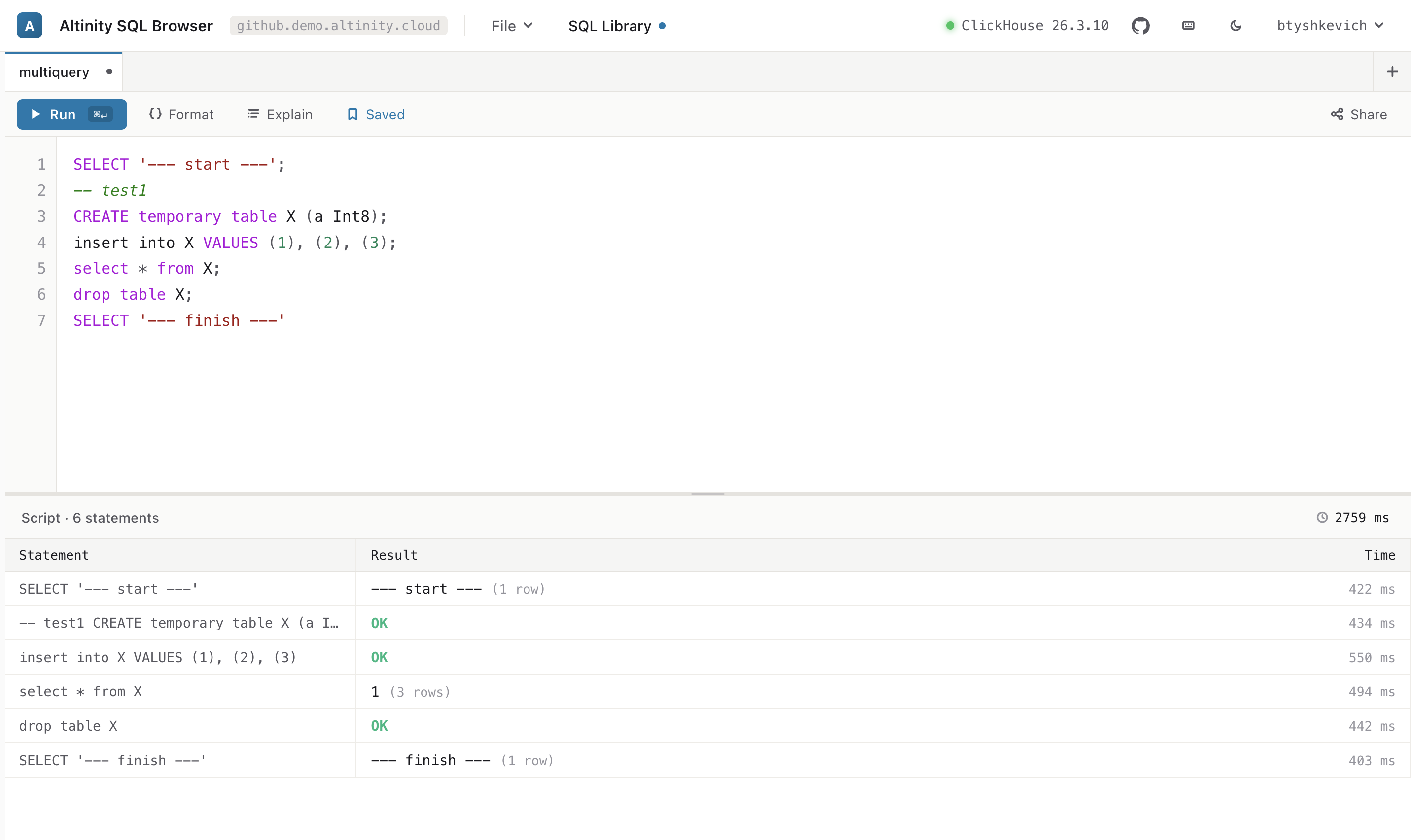
One request per statement, split where it's safe
The split is lexical and client-side: it breaks on top-level ; and skips the
ones inside '…' strings, `…` identifiers, and
-- / # / /* */ comments — so a
semicolon in a string or a comment doesn't cut a statement in half. Each piece is POSTed in turn, the
same model clickhouse-client --multiquery uses. The first error stops the run
and lands on its row; the statements before it already happened (that's how SQL works), the ones after
don't.
The grid has three columns: the statement, its result, and its time. A row-returning statement —
SELECT, SHOW, WITH,
EXPLAIN — shows a one-line preview of the first row; click it for the full table
(capped at 100 rows in script mode). Everything else — CREATE,
INSERT, ALTER, DROP — runs for
effect and reports OK. The slow step is obvious at a glance.
It keeps a session when the script needs one
The interesting case is state that has to survive between statements. A
CREATE TEMPORARY TABLE in statement 2 is useless if statement 4 can't see it.
ClickHouse scopes temporary tables and SET to a session, so the runner attaches
one — but only when the script actually needs it (a TEMPORARY or a
SET in the mix); otherwise statements run session-less. The screenshot above is
the proof: create temp table X, insert three rows, select them back (3 rows),
drop it — as one unit.
Run just the part you mean
The other half is run-selection. Highlight some text in the editor and the Run button becomes Run selection — only the selected statements run. It's how I step through a migration: select the first block, run it, read the grid, select the next. No commenting-out, no scratch tab. With nothing selected, Run takes the whole editor.
A couple of details worth knowing: Cancel kills the statement that's actually running (a fresh
query id per statement, then KILL QUERY), not just the stream; and a clean run
lands as a single history entry, so re-running the whole script is one click. One honest limitation —
an INSERT … FORMAT CSV with inline data that contains a ;
will mis-split, because the splitter can't tell where the inline payload ends. Run those on their own.
Paste your setup-and-test script into the live demo,
or select one statement and run just that — same console, no clickhouse-client
round-trip.